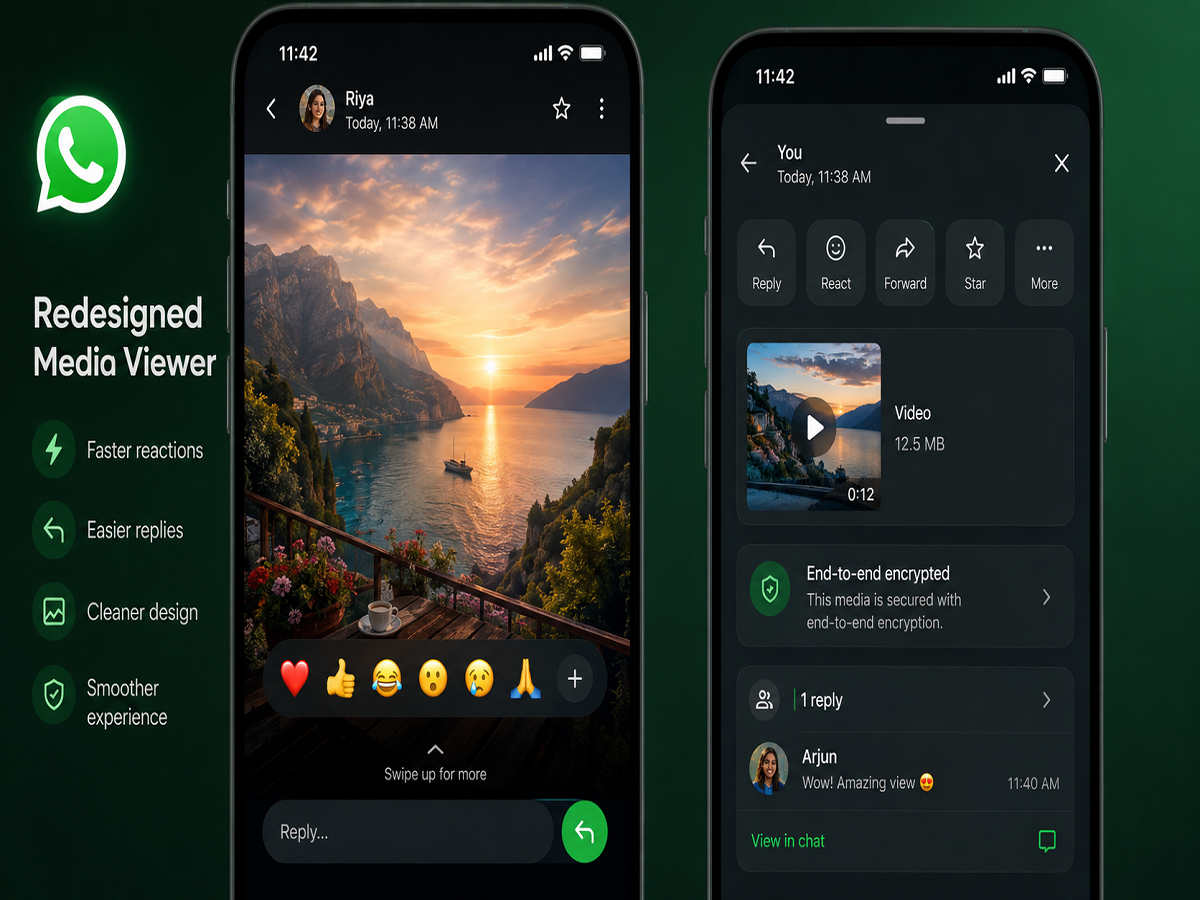
WhatsApp is reportedly working on a redesigned Media Viewer interface that aims to make replying to photos, videos, voice notes, and other shared content much more convenient. The upcoming update is expected to introduce a new reply bar and an improved emoji reaction tray, allowing users to respond without leaving the media viewing screen.
The redesigned interface has been spotted in the latest Android beta version of WhatsApp and is currently being tested before a wider public release.
WhatsApp Plans a More Interactive Media Viewer
According to a report from WABetaInfo, WhatsApp is developing a refreshed Media Viewer interface to simplify the way users interact with shared media inside chats.
At present, users often need to exit the Media Viewer and return to the chat window before replying or reacting to an image or video. The upcoming redesign aims to remove this extra step by bringing reply and reaction tools directly into the Media Viewer.
The new layout is expected to improve the overall messaging experience by making conversations faster and more intuitive.
New Reply Bar to Replace Existing Shortcuts
One of the biggest changes in the upcoming update is the introduction of a dedicated reply bar.
Instead of relying on the existing shortcut options, users will be able to type a response directly while viewing photos, videos, voice messages, or other shared content. This means conversations can continue without interrupting the media viewing experience.
The feature is designed to reduce unnecessary navigation and make replying to shared content more seamless.
Emoji Reactions Will Become Easier
WhatsApp is also preparing an upgraded emoji reaction interface as part of the redesigned Media Viewer.
Reports suggest that users will see a reaction tray at the bottom of the screen, providing quick access to commonly used emojis. The tray is expected to display six default reaction emojis, allowing users to react with a single tap.
If users want to use a different emoji, they can tap the plus (+) icon to open the complete emoji picker and select any reaction available on WhatsApp.
This enhancement is intended to make responding to media faster while keeping the viewing experience uninterrupted.
No Need to Exit the Media Viewer
A major advantage of the new interface is that users will no longer need to close the Media Viewer to interact with shared content.
Whether viewing a photo, watching a video, or listening to a voice note, users can immediately react or send a reply from the same screen. This streamlined workflow is expected to make conversations more fluid, particularly in active group chats and media-heavy conversations.
The update reflects WhatsApp's ongoing effort to reduce unnecessary steps and improve day-to-day usability.
Currently Available for Beta Testers
The redesigned Media Viewer has already entered the testing phase.
According to reports, the feature has been included in WhatsApp Beta for Android version 2.24.11.18, where selected beta users can try the new interface before it reaches the stable release channel.
As with other WhatsApp beta features, there is no official timeline for a global rollout. However, if testing proceeds successfully, the updated interface is expected to arrive for more Android users in the coming months before expanding to other platforms.
WhatsApp Continues to Improve User Experience
The Media Viewer redesign is part of WhatsApp's broader strategy to enhance the messaging experience with faster interactions and smarter interface improvements.
Rather than introducing entirely new communication features, the company is focusing on making existing tools more accessible and reducing the number of taps required to perform common actions.
By allowing replies and emoji reactions directly within the Media Viewer, WhatsApp hopes to make conversations more natural and efficient.
Recent Desktop Calling Features
Alongside interface improvements, WhatsApp has recently expanded its desktop capabilities.
The platform now supports audio and video calling through WhatsApp Web, allowing users to make calls directly from their computers without depending entirely on their smartphones.
WhatsApp has also introduced a Call Transfer feature, enabling users to move an ongoing call between compatible devices, including smartphones and desktop browsers, for a more seamless communication experience.
With the redesigned Media Viewer, WhatsApp continues to refine its platform by combining convenience, faster interactions, and improved usability for users across devices.